Introduction
The Microsoft for Healthcare data model is built on Common Data Model. Therefore, to fully understand the Microsoft for Healthcare data model, it's important to first understand Common Data Model.
This module explains the following concepts:
Common Data Model
Microsoft for Healthcare data model
Options to extend Common Data Model
Common Data Model
If you've brought together data from multiple systems and applications, then you know that it can be an expensive and time-consuming task. Without the ability to share and understand the same data easily, each application, or data integration project, would require a custom implementation.
Common Data Model simplifies this process by providing a shared data language for business and analytical applications to use. It's a common machine-understandable way to describe data with semantic consistency across business, transactional, analytical, and industry domains. This feature helps drive interoperability across apps and services from the Microsoft ecosystem and allows customers to create insights from their data.
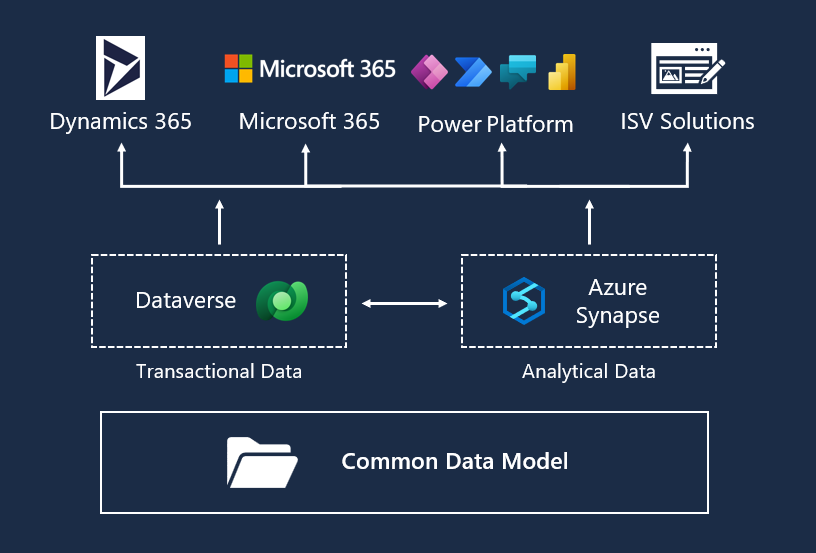
Common Data Model isn't a service; rather, it's a semantically rich set of table and column definitions that you can instantiate as a service.
For business or transactional data, you can instantiate Common Data Model through Microsoft Dataverse (formerly known as Common Data Service). Customers, independent software vendors (ISVs), and partners can use and extend the entity and attribute definitions as needed to access and write business data that's present in Dataverse, including:
Microsoft Dynamics 365 Finance
Finance and operations apps
Microsoft Dynamics 365 Customer Service
Other data that Dynamics 365 creates
For analytical data, you can instantiate Common Data Model through Microsoft Azure Synapse Analytics. Customers, ISVs, and partners can use Azure Synapse to manage and extend Common Data Model definitions and to create new entity definitions as needed.
Common Data Model schema
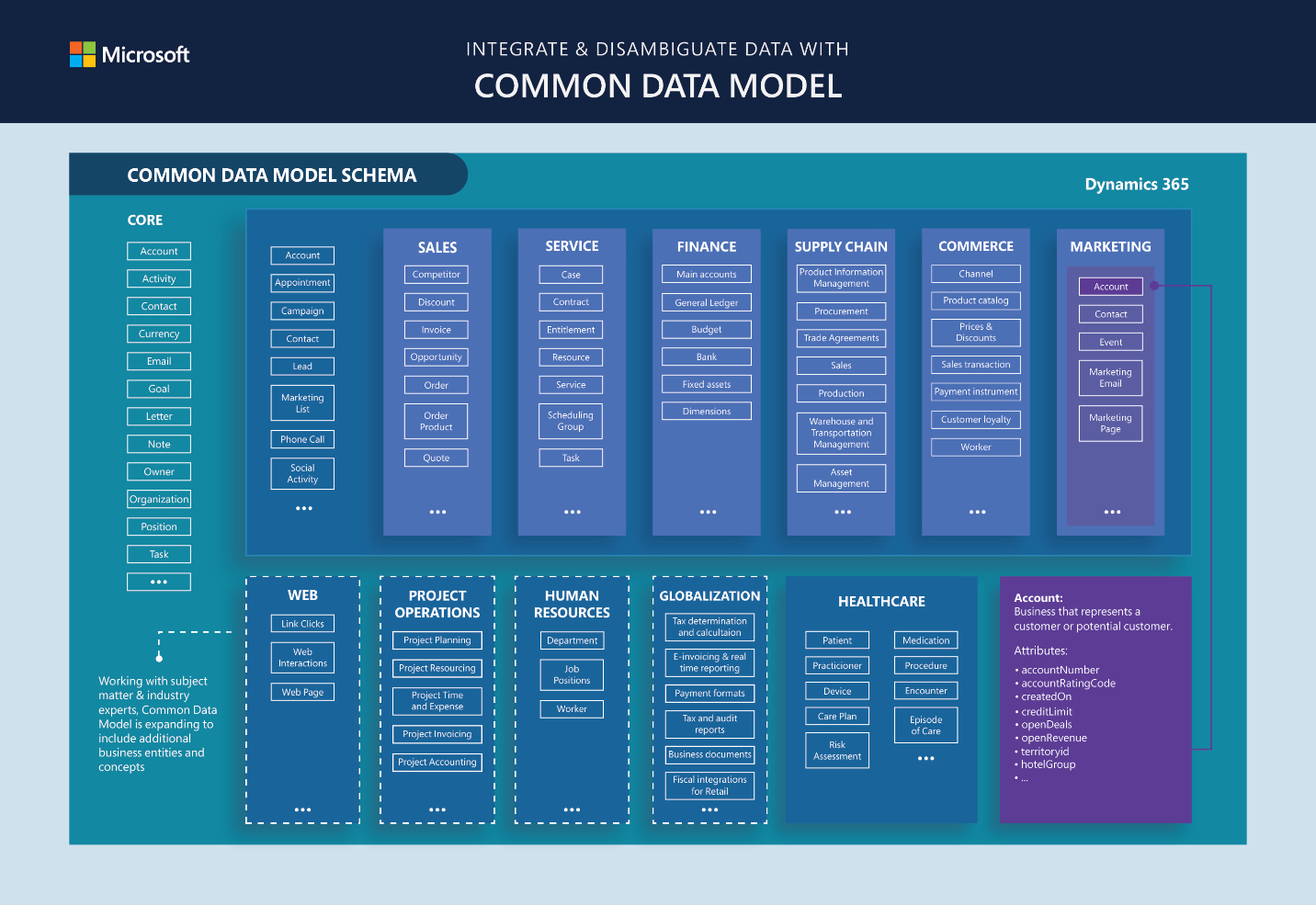
Common Data Model includes a set of standardized, extensible data schemas that Microsoft and its partners have published. This collection of predefined schemas includes entities, attributes, semantic metadata, and relationships. The schemas represent commonly used concepts and activities, such as Patient and Care Plan, to simplify the creation, aggregation, and analysis of data. The following screenshot shows some elements of the standard tables with the Healthcare data model highlighted in the overall Common Data Model schema.
For more information, see Common Data Model.
Healthcare Data Model
The healthcare data model for Dataverse defines a common schema for healthcare business entities, and it's extendable. It's based on the Fast Healthcare Interoperability Resources (FHIR) standards framework. The data model consists of 20+ FHIR/HL7 resources that form the core data constructs that drive Microsoft Cloud for Healthcare.
The healthcare data model for Dataverse includes several prebuilt, model-driven applications that showcase how to build healthcare applications in Microsoft Power Platform by using the data model. Some of these applications can use out-of-the-box tables from the following applications:
Dynamics 365 Customer Service
Dynamics 365 Field Service
Dynamics 365 Customer Insights - Journeys
The entity reference for Dynamics 365 solutions in Microsoft for Healthcare is available in the Overview of Microsoft for Healthcare entities Common Data Model documentation.
The core schema that comprises the Microsoft for Healthcare data model for Dataverse is implemented as a series of related Dataverse tables. Essentially, the HL7 FHIR, JSON-based, document-centric schema has been translated to a relational data model, taking advantage of the Dataverse platform capabilities, namely:
Relational tables
Search indexing
Business application design
Workflows
An extensibility platform
After it's installed, the Healthcare data model for Dataverse is available in managed solutions and is segmented according to the FHIR specifications. Basically, the solutions group the tables according to their corresponding FHIR resources as defined by the HL7 FHIR specification.
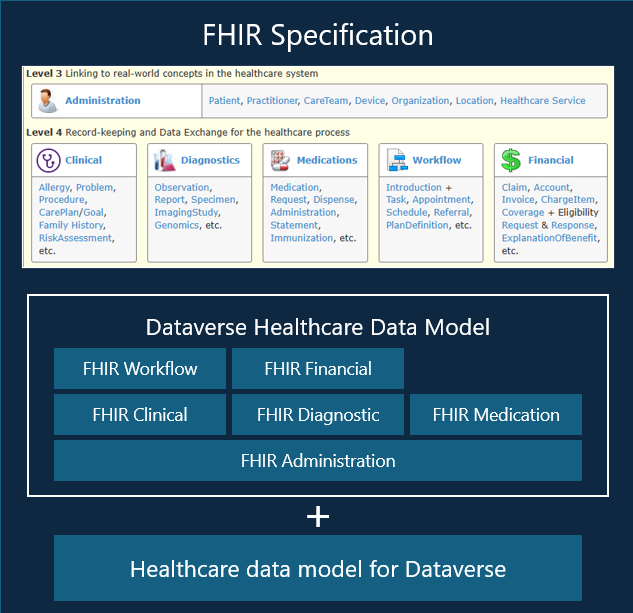
System owners can own, manage, and extend the data model. For example, the data model represents only a subset of FHIR resources, so customers can add their own tables that represent other FHIR resources. Alternatively, customers can add fields to the existing tables to meet their system requirements.
You can instantiate Common Data Model through Dataverse, making this data available to Microsoft Power Platform. Then, all healthcare experiences for better care and insights display through applications and services above this layer. For example, Microsoft Power Apps portals and Microsoft Azure Health Bot enable care coordination and Microsoft Dynamics 365 Customer Insights - Data.
Healthcare capabilities and the healthcare data model
Each Microsoft for Healthcare capability that's available in Microsoft Power Platform admin center is associated with a subset of the healthcare data model, depending on the accompanying scenarios. The following diagram shows the general approach to layering with the deployment packages for the healthcare data model components on the target tenant.
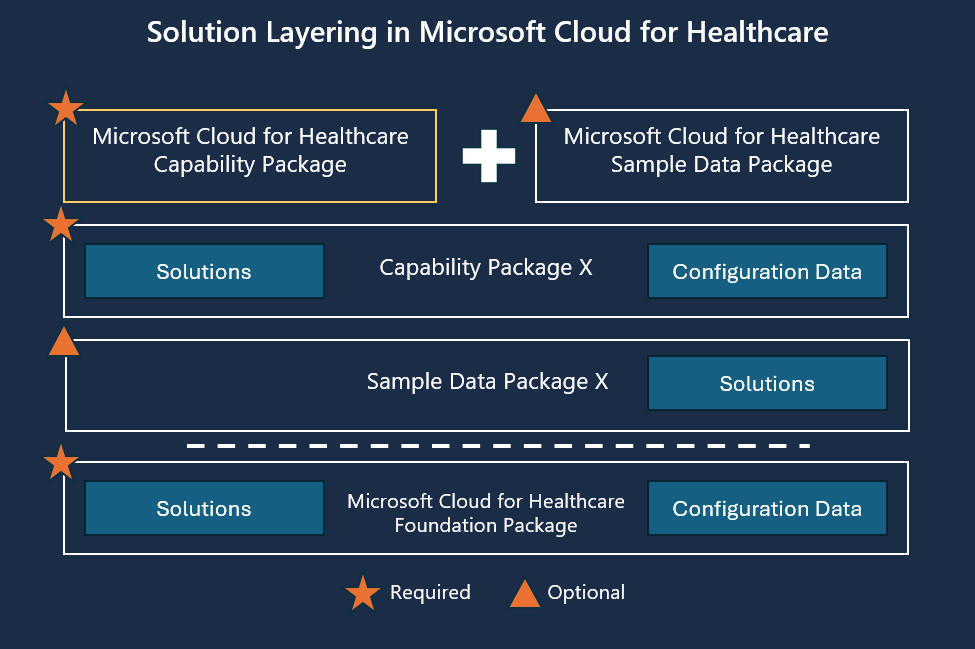
Each Microsoft for Healthcare capability follows a structure and layering convention, and it includes packaging that enables deployment in a controlled manner. At the base is Microsoft for Healthcare Foundation Package, which has a set of solutions and configuration data. The subsequent package layers build on the foundation and include Microsoft for Healthcare capability packages, adding the relevant data model tables for the corresponding package.
Examples of available capability packages are Patient service center, Patient Access, Care Management, or Data integration toolkit. Each capability includes a set of required solutions, possible optional sample data packages, and optional configuration data. Packages allow Microsoft for Healthcare customers to select only the solutions and packages that they need for their requirements.
For example, if you choose to install Care Management, the Microsoft for Healthcare capability package would be for care management. Then, this capability package would only include the Healthcare data model for care management.
Healthcare data model for Dataverse deployment
These capability packages and the Microsoft healthcare data model are available for deployment through the Microsoft Power Platform admin center. For more information on the installation order and dependencies, see Deploy healthcare solutions in Power Platform admin center.
You can deploy one or more capabilities and that completes the following actions:
Validates the underlying dependencies.
Provides options for installing the related sample packages.
Deploys each package in the correct order.
In the Power Platform admin center > Dynamics 365 Apps, you can search to filter the capability from the list.
Microsoft for Healthcare includes several data management-specific capability packages and related services. The solutions in the packages are segmented according to the HL7 specifications, and the capability packages are further grouped according to focused usage areas. For example, Dynamics 365 Apps includes the following data models:
Payor data model (Healthcare FHIR Common Data Model)
Provider data model (Healthcare FHIR Common Data Model)
Life sciences data model (Healthcare FHIR Common Data Model)
This segmentation helps customers select only the data model components that are required for their solution.
Data Model Extensibility
Microsoft for Healthcare comes prebuilt with many functionalities out of the box. However, an extension mechanism is necessary for situations when customization is required.
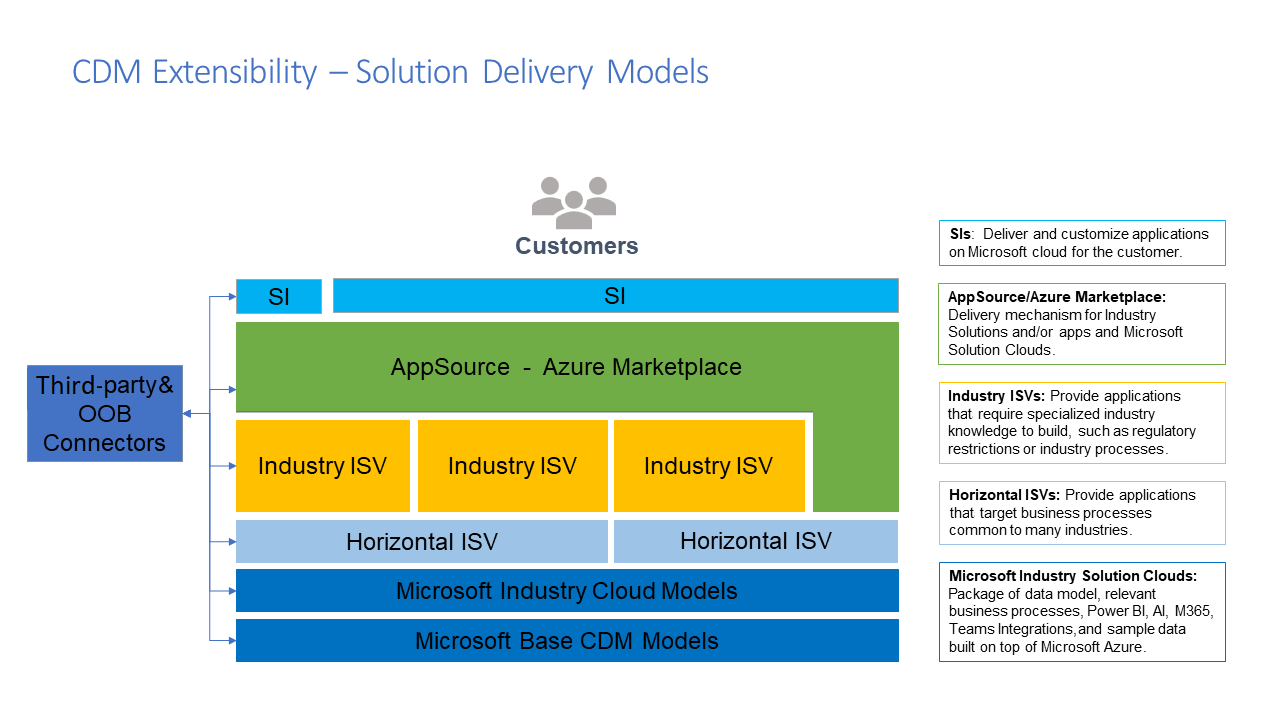
Microsoft Industry Solution Clouds package the data model along with the relevant business processes, such as Microsoft Power BI, AI, Microsoft 365, Microsoft Teams integrations, and sample data that's built on top of Microsoft Azure. Hence, you have the flexibility to extend these components at each layer. If you intend to extend the Microsoft for Healthcare solution, multiple solution delivery mechanisms are available for independent software vendors (ISVs):
If you're a horizontal ISV, then you provide applications that target business processes that are common to many industries and can build on one or more industry cloud data models.
If you're an industry ISV or a customer who caters to a specific industry, such as healthcare, then you can build on top of the data model and extend vertical or micro-vertical scenarios, such as building a highly advanced patient engagement workflow in healthcare. Additionally, you can use the Internet Protocol (IP) or connectors from another ISV and build solutions that extend their IP.
If you intend to publish your solutions and reach out to your customers, the delivery mechanism for industry solutions is available in Microsoft AppSource and Azure Marketplace. If you're a partner, then you can bring in the IP from multiple ISVs to extend and implement for your customers.
Multiple solution delivery models are available to Microsoft partners and providers to help bring value to customers.